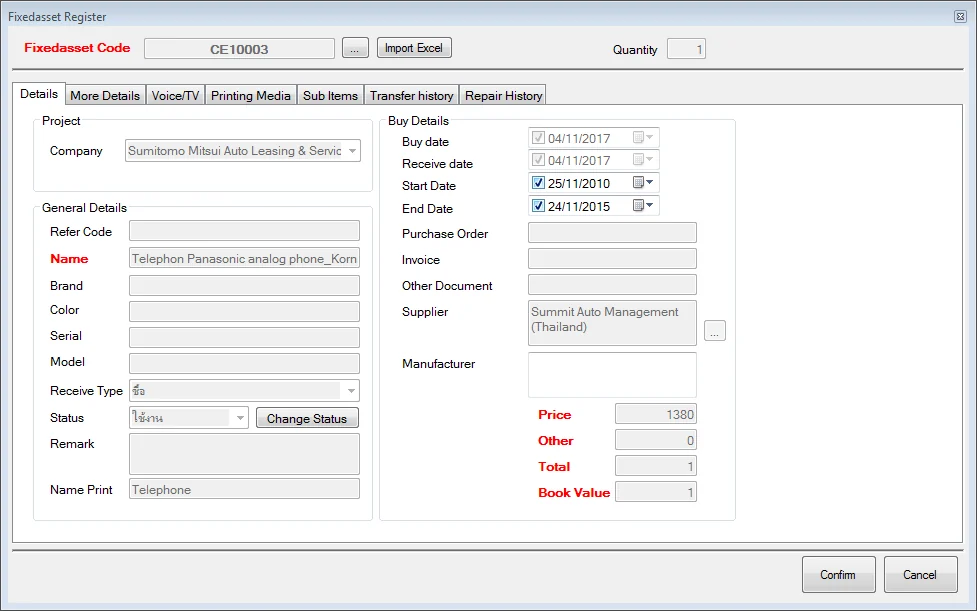
Asset Management holds the data for every asset in the organisation in one place. The system issues each item an asset code as its identity, then works with barcode or RFID technology so you can search, check quantities, confirm who holds an item and count it accurately.
Worth knowing up front: this system looks after the asset register and control of the physical asset, holding purchase price and book value as reference data. Depreciation calculation and posting under accounting standards remain the job of the accounting package or ERP you run, which it can exchange data with.
What Changes When Every Asset Lives in One System
- Manage assets systematically — one system for the whole organisation, easy to search, with history you can review.
- Control and track status — know where an asset is, which department holds it, who is responsible, and audit moves, loans and repairs with evidence.
- Reduce losses — identify assets by QR code or RFID so counts are correct and unauthorised use is prevented.
- Link to other systems — procurement, finance and inventory — cutting duplicated work and mismatched data between departments.
What the Software Does
Asset operations
- Asset creation (Fixed Asset Registration)
- Querying asset location, status and other details
- Transferring assets between holders or departments
- Sending an asset out for repair
- Receiving it back after repair
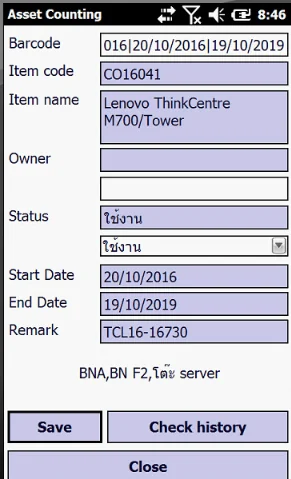
- Counting assets with a handheld reader
- Reviewing count data before confirming the result
Ten report types
- All assets
- By holder
- By department
- By site and position
- By receipt date
- Repairs sent and returned
- Transfers
- By type, kind or group
- Count results
- Annual report
Master data
- Asset master
- Employees responsible for assets
- Suppliers
- Departments and projects
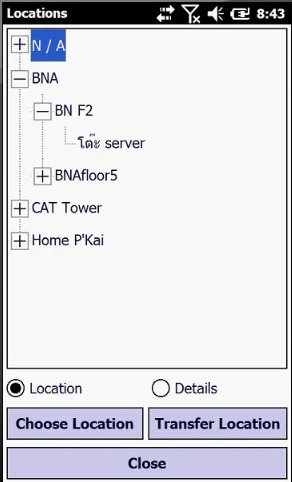
Plus three-level place and classification structures, shown in the diagram below.
From Untagged Asset to Countable Asset
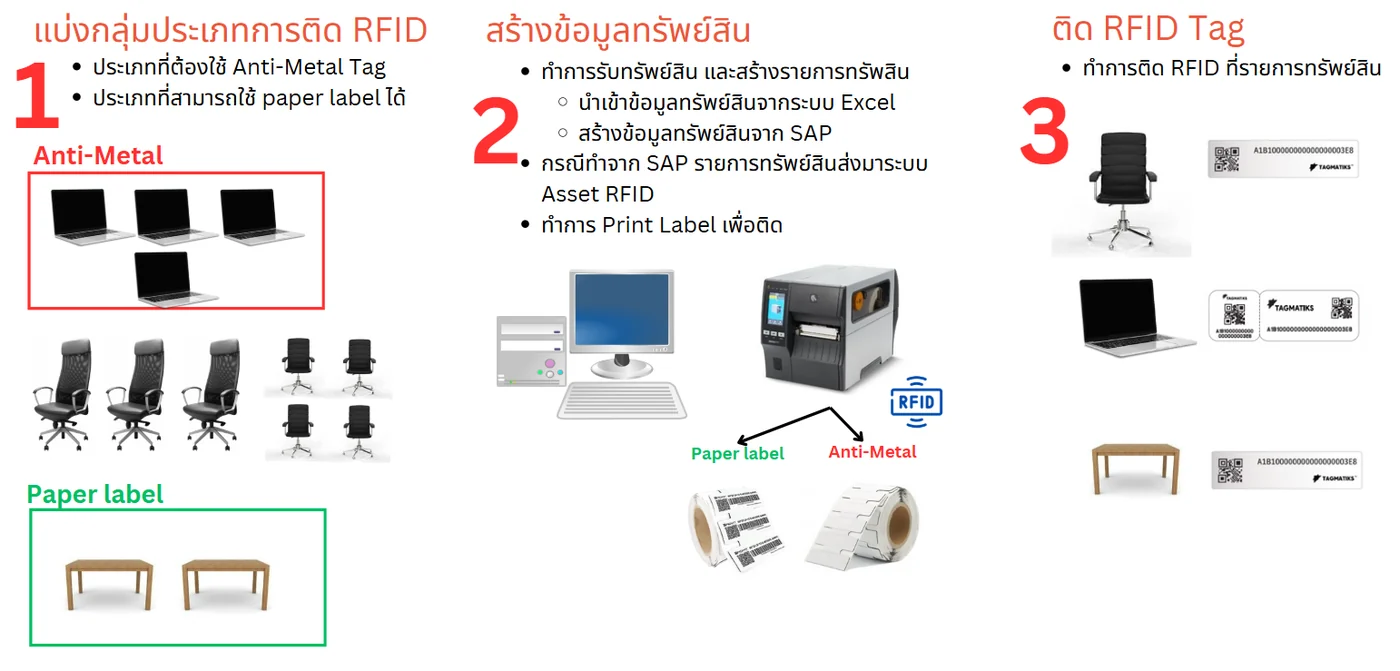
- Split the assets by tag type — which need an anti-metal tag and which a paper label will do for.
- Create the asset records, importing from Excel or taking the list pushed across from SAP.
- Print the labels from a barcode printer — both paper labels and anti-metal tags.
- Attach the RFID tag to each asset and bind the tag ID to the asset code in the system.
Counting with a Handheld Reader
- Select the assets and the locations to be counted.
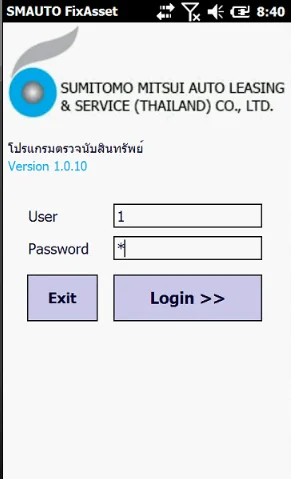
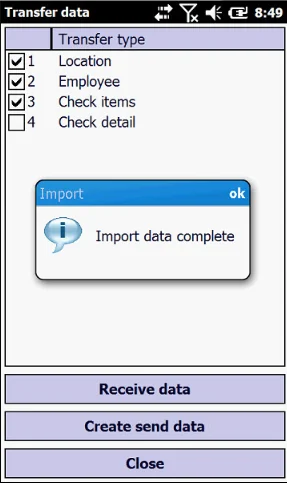
- Dock the handheld to the computer and export the asset and location data onto it.
- Walk the count on site, scanning barcodes or reading RFID tags area by area.
- Bring the reader back and upload the count results into the system.
- Review found, missing and misplaced items, then confirm to update the register.
Reader range
- Handheld reader — roughly 1–2 metres, suited to walking a room or a rack line.
- Fixed reader — roughly 5–10 metres, suited to entry and exit points.
Cloud-Deployed, API-Connected
Equipment used with the system — anti-metal tags, hang tags, cable-tie tags, the iData T1 UHF and iData T2 UHF handhelds, plus a barcode printer for the asset labels.
If you want our team on site to survey, choose the tag type, tag the assets and walk the first count, see asset tracking and audit services.
Fixed Asset Software FAQ
Does BN AUTO ID's Fixed Asset software calculate depreciation?
Our system focuses on the register and on controlling the physical asset — recording asset data, purchase price and the book value received from the accounting system, plus transfers, repairs and counting. Calculating depreciation and posting to the ledger under accounting standards remains the job of the accounting package or ERP you already run, which we integrate with.
How is this different from your asset-counting service?
This page is the software you keep and use every day to hold the asset register. The asset-counting service is our team coming on site to survey, choose the tag type, tag the assets and walk the count. Most organisations use both — we deploy and tag first, then they run the software themselves.
Can we move an existing register in from Excel or SAP?
Yes. The system imports asset data from Excel and accepts records pushed from SAP, after which you print the labels and pair each existing asset code with the RFID or barcode tag physically attached to the item. The old register does not have to be retyped.
How do you tag metal assets such as steel cabinets or laptops?
The first step of any deployment is splitting the assets into two groups: those needing an anti-metal tag, such as laptops and steel cabinets, and those a paper label will do for, such as wooden desks — because an ordinary RFID tag will not read off a metal surface. We test against your actual assets before ordering tags.
Does counting on the handheld need a network connection throughout?
No. The counting workflow loads the asset and location data onto the reader before the walk begins, so staff can count in areas with no signal and dock the device afterwards to upload the results. Where live data is wanted, the handheld can work online over WIFI instead.
Want to know whether your assets are all still there?
Let our team survey your site and assess it free, before you commit.
0-2944-0817 Contact Us