BN AUTO ID WMS
A real-time warehouse management system covering warehouse operations, manufacturing and full ERP integration.
An enterprise-grade WMS supporting both cloud and on-premise architectures.
Platform Overview
- Multi-Device: barcode, QR code, RFID and Android handheld
- Integration Ready: built-in REST API and ERP integration
- Multi-Level Mgmt: multi-company, multi-warehouse, multi zone/bin
- Modern Stack: built on a modern web and mobile application stack
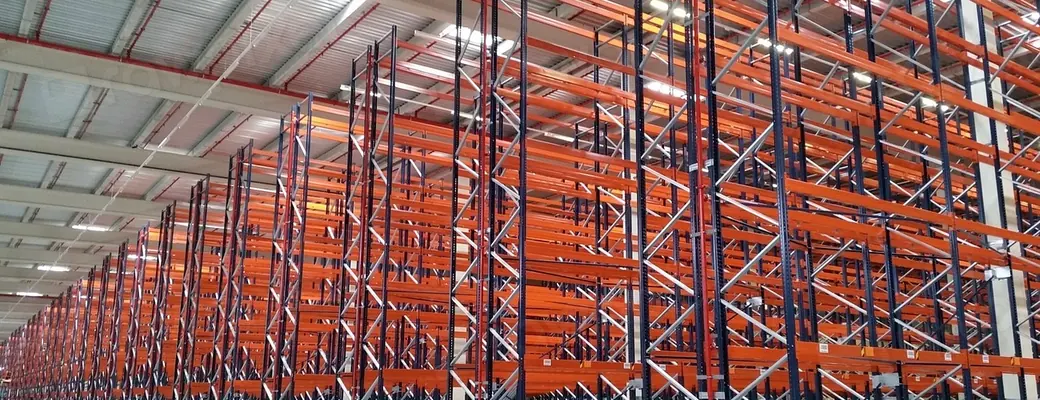
A systematically racked warehouse — the foundation BN AUTO ID WMS manages down to zone, location and bin
What Is a WMS, and How Does It Differ from Inventory Software?
WMS stands for Warehouse Management System — software that controls what happens inside the warehouse, from receiving and put-away through transfer, picking and stock counting, recording every movement in real time via barcode or RFID so you always know where stock sits, how much is left and who moved it.
How a WMS differs from basic inventory software
- Basic inventory software answers “how many”. A WMS answers “in which location, picked by whom, and when”.
- A WMS directs floor staff through a handheld, instead of relying on someone keying movements in afterwards.
- It handles lot/batch, serial and expiry data with FIFO/FEFO issue rules, which basic inventory tools usually lack.
- It integrates with ERP so balances and documents flow back into accounting without re-keying.
What stock counting in the WMS covers
- Cycle counting by zone or product group, without shutting the whole warehouse down.
- Full annual counts with count sheets and area assignments for each team.
- Blind counting that hides the system quantity so counters cannot see the expected figure.
- Variance summaries with an approval step before adjustment, then posting the adjustment back to ERP.
- RFID bulk reading to cut counting time in high-item-count warehouses.
Only need the counting side rather than a full warehouse system? See stock counting
What determines the price of a WMS
- Concurrent users, and how many warehouses or sites are covered.
- Which workflows you switch on — often receiving and counting first, expanding into picking or production later.
- Cloud deployment versus on-premise on your own servers.
- ERP integration work and any customisation to match your specific processes.
- Field hardware to supply — handhelds, printers, labels or RFID tags.
We do not quote a flat price, because scope varies so widely. The fastest route is a free site survey and assessment, after which we propose the most cost-effective first phase.
Challenges and How We Solve Them
Challenges in a Modern Warehouse
- Stock goes missing and locations cannot be checked in real time
- Slow picking and manual data entry
- Expired or dead stock because FIFO/FEFO is not enforced
- Warehouse and ERP data disagree, causing duplicated work
How BN AUTO ID WMS Solves It
- Real-time inventory control with barcode, QR code and RFID
- Supports multi-warehouse, multi-company and multi-branch operations
- High-performance Android handheld and web application
- Seamless integration with leading ERPs (SAP, D365, Oracle, Odoo)
Core Capabilities
Real-time Inventory
Stock updates the moment anything moves, with accurate location and balance checking.
Lot / Batch & Serial
Deep traceability with full Lot, Batch, Serial Number and expiry-date control.
FIFO / FEFO Control
Automatic pick sequencing that prevents expiry and reduces stock deterioration.
Location & Bin Mgmt
Manage space down to zone, location and bin for faster put-away and picking.
Master Data & Inventory
Storage is managed all the way down to the individual bin
Master Data Management
- Company / Warehouse / Zone
- Location / Bin Management
- Item Master / Item Group / Unit
- Supplier / Customer / Vehicle
Inventory Control
- Opening Stock & Stock Adjustment
- Stock Transfer & Stock Inquiry
- Stock Balance & History Tracking
- Physical Count & Cycle Count
Internal Movements
- Transfer Warehouse & Location
- Replenishment
- Consolidation
- Cross Docking Operations
Inbound, Outbound and Production
Inbound Workflow
- Purchase Order — Receive the PO from ERP or create it in the WMS
- Receiving — Scan goods in (PO / ASN receive) on the handheld
- QC Inspection — Quality check and damage inspection
- Put Away — The system suggests a bin/location for storage
- Available Stock — Stock becomes available and the result is posted back to ERP
Outbound Workflow
- Sales Order — Receive the sales order from ERP or the sales system
- Picking — Pick by wave / batch / SO on the handheld
- Packing — Verify accuracy and pack
- Loading — Scan goods onto the vehicle and verify the shipment
- Shipment Complete — Confirm delivery and update status back to ERP
Production WMS (WIP)
- Material Request — Request raw material per production order / BOM
- Picking to Production — Pick raw material and feed the production line
- Issue Raw Material — Issue raw material into the production process
- Report Finished Goods — Receive finished goods (FG) into the main warehouse
- Return Material — Return leftover material to the warehouse
Barcode, RFID and Field Devices
Barcode, QR & RFID
- Barcode & QR: 1D, 2D QR and DataMatrix
- Passive UHF RFID: long-range bulk reading of many tags at once
- RFID gate: automatic check-in/check-out as goods pass through
Android Handheld
- End to end: receive, put away, picking, transfer, count, shipping
- Online & offline mode: keeps working when the network drops
- Lookup item & stock: check item detail and balance instantly
- Mobile printing: print barcode / RFID labels on a portable printer
Works out of the box with the hardware we supply: RFID systems · mobile computers · barcode printers
Executive Dashboard and Reports
Executive Dashboard
- Stock Value
- Inventory Turnover
- Fast / Slow Moving
- Aging Report
- Warehouse Utilization Rate
Comprehensive Reports
- Stock Card
- Stock Balance
- Expiry & Batch Tracking
- Operations Productivity
- Cycle Count Analysis
Management & Controls
- User roles and permissions
- Document approval workflow
- Flexible system configuration
ERP Integration & REST API
Supported ERP Systems
Two-way synchronization with leading ERP systems.
REST API & Security
- Auth standard: Bearer Token, JWT and HTTPS encryption
- API endpoints: receive, issue, transfer, stock inquiry
- Master sync: item master, customer and supplier data
Technology Stack
| Layer | Technology Stack | Key Features |
|---|---|---|
| Frontend Application | Angular & Tailwind CSS | Responsive, web-based, high-performance UI |
| Backend Services | ASP.NET Core 8 Web API | Cross-platform, high throughput, scalable |
| Database Management | PostgreSQL / Enterprise SQL Server | ACID compliant, high availability and data integrity |
| Mobile Handheld | Handheld Android application | Native performance, barcode/RFID SDK integration |
| Cloud & Deployment | Alibaba Cloud / Microsoft Azure | Container-ready, on-premise or hybrid |
| System Security | RBAC, audit trail and encryption | Warehouse/location permissions, login audit tracking |
What Your Business Gains
- Less time spent: receiving and picking accelerated by over 50%
- Errors eliminated: barcode/RFID verification at every step
- Real-time visibility: stock status and locations available 24 hours a day
- Ready to grow: add warehouses and branches, and support ASRS/automation later
Frequently Asked Questions
How is BN AUTO ID WMS different from basic inventory software?
BN AUTO ID WMS is a full enterprise warehouse system: zone, location and bin management, Lot/Batch/Serial and expiry control, FIFO/FEFO, Android handheld and RFID operation, plus two-way ERP integration. Good Morning Stock is our lite inventory program — the key functions distilled for smaller businesses.
Which ERP systems does it integrate with?
Two-way synchronization with SAP (ECC, S/4HANA, Business One), Microsoft Dynamics 365 (FO, BC), Oracle and Odoo over a REST API secured with Bearer Token, JWT and HTTPS — covering receive, issue, transfer and stock inquiry, plus item master, customer and supplier sync.
Does it support FIFO/FEFO and expiry dates?
Yes. Picking is sequenced automatically by FIFO or FEFO, with Lot, Batch and Serial Number control plus per-item expiry dates — reducing expired and dead stock.
Does it work with RFID or only barcodes?
Both. It supports 1D barcodes, 2D QR codes and DataMatrix, as well as passive UHF RFID for long-range bulk reading, and works with RFID gates and fixed or handheld readers.
Can it be deployed on cloud or on-premise?
Both. Built on Angular and ASP.NET Core 8 Web API with PostgreSQL or SQL Server, it is container-ready for Alibaba Cloud, Microsoft Azure, on-premise or hybrid deployment.
Does the handheld work without a network connection?
Yes. The Android handheld app has both online and offline modes — it keeps working when the network drops and resyncs once reconnected — plus item and stock lookup and barcode/RFID label printing on a portable printer.
Can it be used in a manufacturing plant?
Yes. A production warehouse module tracks work in process (WIP): material request per production order or BOM, picking to production, issuing raw material, reporting finished goods into the warehouse, and returning leftover material.
How much does the WMS cost, and how is it priced?
Pricing depends on the number of users and warehouses, which workflows you switch on, cloud versus on-premise deployment, the ERP integration required, and any field hardware. We do not quote a flat rate — we start with a free site survey and assessment, then propose the most cost-effective first phase.
How does stock counting work — do we have to shut the warehouse down?
You do not have to stop the whole warehouse. The system supports cycle counting by zone or product group while normal work continues, as well as full annual counts. A blind-count mode hides the system quantity from counters, and variances go through an approval step before any adjustment. With RFID, bulk reading cuts counting time substantially.
Ready to upgrade your warehouse with BN AUTO ID WMS?
Talk to our team for a requirements assessment and a quote.
Get a Quote 0-2944-0817Need design and implementation too? See our warehouse consulting and integration services